

FS Panel Studio 2.0
Creates and edits Microsoft Flight Simulator panels
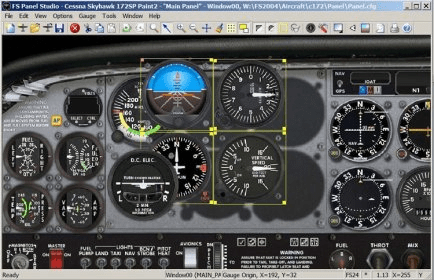
Add custom panels to Microsoft Flight Simulator. Generate or import a gauge in the editing module, adjust its location and dimensions, stretch or compress it. Preview the results in real time and deploy the element. Access the CFG file and edit it in a simplified manner.
FS Panel Studio is the best tool available for creating and editing Microsoft Flight Simulator Panels. The fully graphical interface lets you drag, drop and stretch your gauges and immediately see the results. You don't have to be a programmer or understand Microsoft Flight Simulator panel.cfg file syntax to create great looking custom Panels.
Design or modify a Panel in minutes in one session. See exactly what you'll get when you run Flight Simulator. Use your mouse to add, delete, move and resize Gauges. Stretch gauge widths or heights independently for a perfect fit. Add windows and set their positions with 1 pixel accuracy.
For the first time you can create new Gauges, and edit (using your favorite bitmap editor) any Gauge bitmap for a truly unique Panel. FS Panel Studio® is written in C to make it small and blazingly fast. No long waits for screen redraws. Simply the best panel editor available.
Details
Extensions

No information available
The data will be available later.Awards

There are no awards
Over time, app awards will appear here.


Comments